USDT Sent to the Wrong Network? What Indian Users Should Check
USDT sent to the wrong network can be worrying, especially when you notice the mistake only after confirming the transfer.
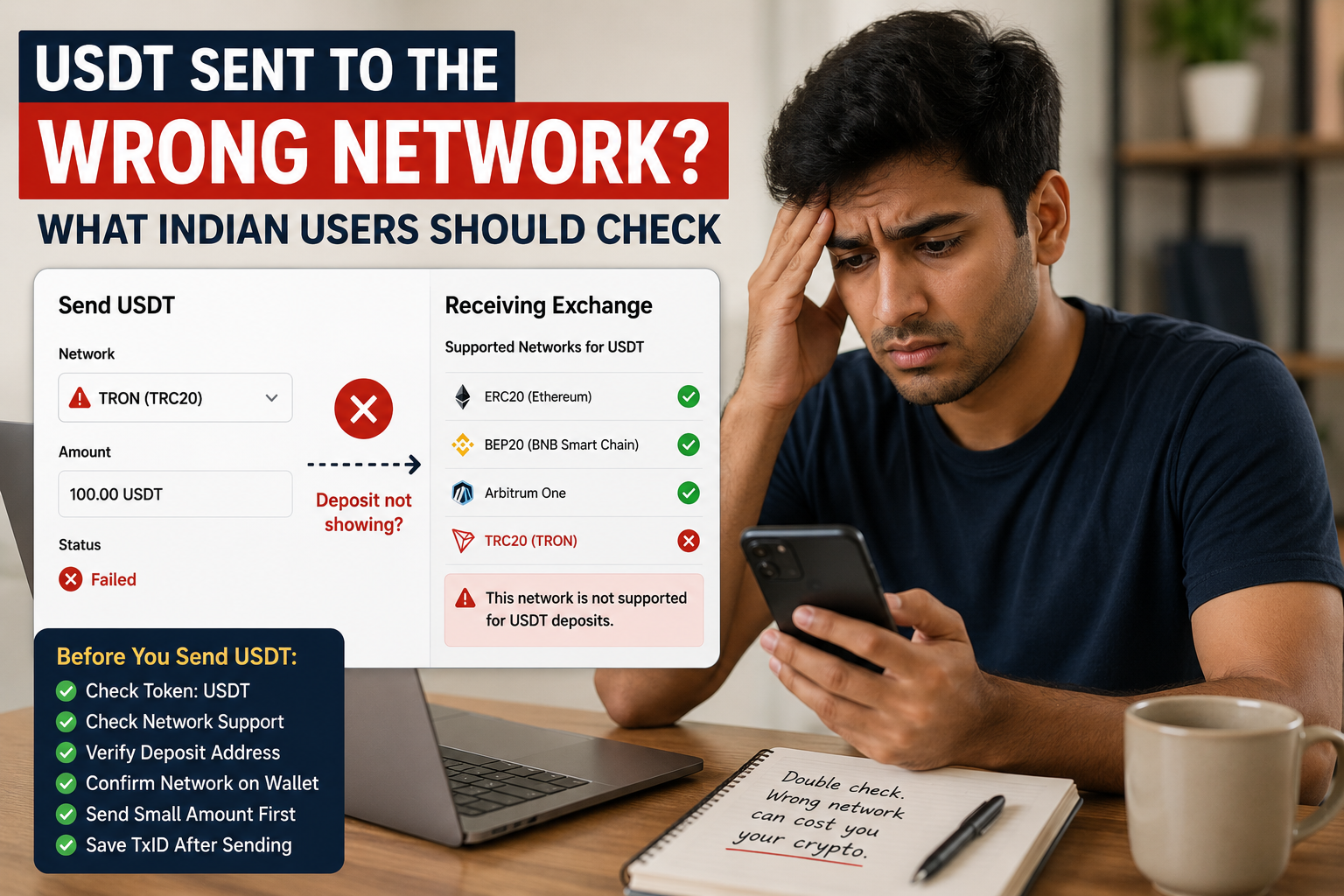
You may have wanted to send USDT through TRC20 but selected another network.
Or you may have copied a deposit address from an exchange without checking which USDT network that address was meant for.
Then the transfer leaves your wallet, but the receiving balance does not appear.
The first reaction may be to panic.
Do not immediately send another payment.
Before doing anything else, check exactly what happened to the first transaction.
First, Understand What “Wrong Network” Means
USDT can exist on more than one blockchain network.
For example, USDT can be used as TRC20 on the TRON network and as ERC20 on Ethereum.
The token may still be called USDT, but the networks are different.
This matters when you are sending USDT to an exchange, wallet or another platform.
The receiving side may support:
- TRC20,
- ERC20,
- several USDT networks,
- or only specific networks.
If the sender and receiver are not using a compatible network, the deposit may not appear normally.
That is why checking the network should happen before every crypto transfer.
Do Not Confuse the Token With the Network
This is one of the easiest mistakes to make.
You may see:
USDT
on both the sending wallet and receiving platform.
That does not automatically mean you can choose any network.
Think of these as two separate questions:
What token am I sending?
and:
Which blockchain network am I using?
The answer to the first question may be USDT.
The answer to the second could be TRON, Ethereum or another supported network.
Both need to be correct.
If you are still unsure about this difference, our USDT TRC20 vs ERC20 guide explains it in simple terms.
Check Which Network You Actually Used
Open the wallet or exchange that you used to send the USDT.
Find the transaction or withdrawal history.
Open the specific payment.
Look for information such as:
- network,
- protocol,
- chain,
- transaction hash,
- TxID,
- withdrawal status.
If it says TRC20 or TRON, the transaction was sent through the TRON network.
If another network is shown, make a note of it.
Do not rely on memory.
Check the actual transaction information.
Find the TxID
If the transfer has already been sent to a blockchain, it should normally have a transaction identifier.
This may be called:
- TxID,
- Transaction Hash,
- Tx Hash,
- Transaction ID.
Copy it carefully.
A TxID helps you identify the exact blockchain transaction that you are investigating.
It is not the same as the receiving wallet address.
If you are unfamiliar with transaction hashes, our USDT transaction hash (TxID) guide explains what they are and how to use them.
Check the Correct Blockchain Explorer
Once you know the network, use an explorer that matches that blockchain.
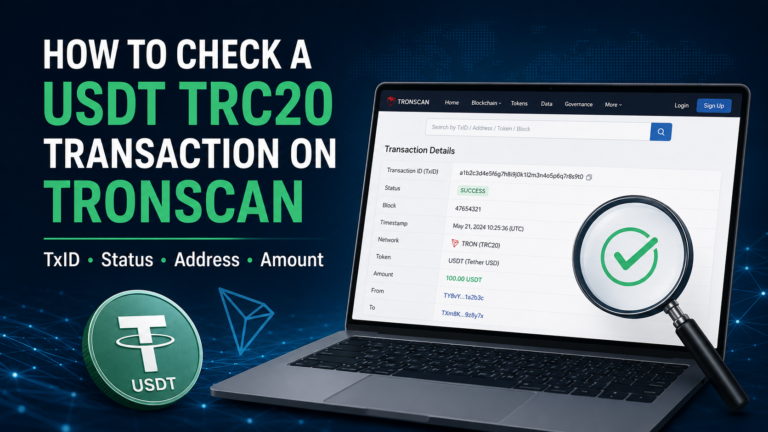
For a USDT TRC20 transaction, you can check the TxID on TRONSCAN.
Do not search for a TRON transaction on the wrong blockchain explorer and then assume the transaction disappeared.
If you sent USDT through TRC20, our guide on how to check a USDT TRC20 transaction on TRONSCAN shows the process step by step.
When you find the transaction, check:
- transaction status,
- receiving address,
- token,
- amount,
- network information.
This gives you a clearer picture of what actually happened.
Was the Transaction Successful?
The next question is simple:
Did the blockchain process the transaction successfully?
If the transaction failed, the situation is different from a successful transfer sent to an unsupported destination.
If it shows success, that means the transaction has been processed on the blockchain you used.
But it does not automatically mean the receiving platform can credit the deposit.
You still need to check the address and network support.
Check the Receiving Address Carefully
Compare the receiving address shown in the blockchain transaction with the address you intended to use.
Do not check only one or two characters.
Crypto addresses can be long.
If possible, compare the full address with the original deposit address.
Ask yourself:
Did I send to the correct address?
If the address itself is different from the one you intended to use, this is not only a network problem.
You may be dealing with a wrong-address transfer.
Do not send more USDT while you are still trying to understand what happened.
Now Check the Receiving Platform
Open the exchange or wallet that was supposed to receive the USDT.
Go back to its deposit page.
Select USDT.
Look at the networks that the platform currently supports for deposits.
Do not assume it supports TRC20 simply because it accepts USDT.
The important question is:
Does the receiving platform support the exact network that I used?
If yes, the issue may be something other than a network mismatch.
If no, you should contact the receiving platform before trying anything else.
What If You Sent TRC20 to a Platform That Supports Only Another Network?
Suppose you sent USDT through TRC20.
The transaction is successful on TRON.
The receiving address is the address you copied from the platform.
But the platform does not support USDT deposits through TRC20.
Waiting for more blockchain confirmations will not change the network that was used.
The transaction has already been sent through TRON.
At this point, the receiving platform is usually the most relevant place to ask about possible recovery.
Do not assume recovery is available.
Whether anything can be recovered depends on how the receiving service manages its wallets and which networks it supports.
What If the Receiving Wallet Supports More Than One Network?
This situation can be different.
Some self-custody wallets can work with several blockchain networks.
However, that does not mean every wallet automatically displays every token sent through every network.
The important questions remain:
- Which blockchain received the transaction?
- Does the wallet support that blockchain?
- Does the user control the receiving wallet?
- Can that wallet display the token on that network?
Do not import random wallet files, private keys or recovery phrases into websites that promise to find missing USDT.
If you do not understand the wallet setup, use the official support information for that wallet.
A Successful Transaction Does Not Mean the Network Was Correct
This is an important point.
A blockchain can successfully process a transaction even when the network you selected was not the network required by the receiving platform.
“Success” tells you what happened on that blockchain.
It does not tell you that:
- you selected the correct deposit network,
- the receiving platform supports that network,
- or the platform will automatically credit the deposit.
So when checking a transaction, do not stop after seeing the word “Success.”
Check the complete situation.
Do Not Send the Same Amount Again Yet
Imagine you wanted to send 100 USDT.
You notice that the receiving balance is still empty.
You worry that you selected the wrong network.
Then you immediately send another 100 USDT.
Now you have two separate transactions to investigate instead of one.
Before making a second transfer, understand the first one.
Check:
- Which network was used?
- Was the transaction successful?
- Is the receiving address correct?
- Does the receiving platform support that network?
- Is the original deposit still being processed?
A second transaction will not repair the first one.
What If the Platform Supports TRC20 but the Deposit Is Still Missing?
Then the problem may not be the network.
If all of these are correct:
- you sent USDT,
- you selected TRC20,
- the receiving platform supports TRC20,
- the receiving address is correct,
- and the blockchain transaction is successful,
check the receiving platform’s deposit history.
The deposit may still be:
- processing,
- waiting for confirmation,
- under review,
- or waiting for another platform-side step.
Our USDT TRC20 deposit not showing guide covers this situation in more detail.
This is why you should confirm that a real network mismatch exists before looking for recovery options.
Do Not Assume More Confirmations Will Fix a Network Mistake
Confirmations help show that a transaction has become more settled on the blockchain.
They do not change the network used for the transfer.
If you sent through TRON, additional confirmations will still be confirmations of that TRON transaction.
They will not convert the transfer into ERC20 or another network.
Our USDT confirmations guide explains why confirmation status and receiving-platform credit are separate parts of a transfer.
Contact the Receiving Platform First When the Transaction Already Succeeded
If the blockchain explorer shows a successful transaction and the USDT has already left the sending side, the receiving platform may be the most useful place to contact.
Prepare the transaction details before contacting support.
Useful information may include:
- TxID,
- token name,
- amount,
- network used,
- receiving address,
- approximate transfer time.
Describe what happened clearly.
For example:
“I sent USDT using TRC20, but I later realised that the deposit page may not support that network. Here is the transaction hash.”
You do not need to write a long story.
Give support enough information to identify the transaction.
Do Not Expect Support to Guarantee Recovery
Crypto transfers can be difficult to reverse after they have been processed by a blockchain.
A receiving platform may be able to investigate an unsupported-network deposit.
But that does not mean every platform can recover every transfer.
The outcome can depend on:
- the network,
- wallet infrastructure,
- receiving address,
- token,
- platform policy,
- and whether the service can technically access the funds.
Treat recovery as something that needs to be investigated, not something guaranteed.
Do not send additional money to someone who promises that recovery is certain.
Be Careful With “Recovery Fees”
A missing crypto transfer can attract scammers.
Someone may contact you and say:
“Your USDT is stuck between networks.”
They may then ask you to send another payment to:
- activate the transaction,
- unlock the USDT,
- convert the network,
- release the deposit,
- or pay a recovery fee.
Be careful.
Do not send money simply because a stranger claims they can reverse a blockchain transaction.
Use the official support channel of the wallet or platform involved.
Never Share Your Seed Phrase
Support may need the TxID.
They may need to know:
- network,
- amount,
- receiving address,
- transaction time.
But your seed phrase is different.
Never give someone your:
- seed phrase,
- recovery phrase,
- private key,
- wallet password,
- OTP,
- or remote access to your device
just because they say they can recover a transfer.
A TxID is used to identify a transaction.
A seed phrase or private key can give control over a wallet.
Do not confuse the two.
Be Careful With Fake Customer Support
When people are worried about missing USDT, they may search online for support.
That can lead to fake phone numbers, fake Telegram accounts, fake social media profiles or websites pretending to be an exchange.
Do not contact a support number simply because it appeared near the top of a random search result or in a comment.
Open the platform’s official website or app and find its support section there.
A mistake with one transaction should not become a bigger security problem.
What If There Is No TxID Yet?
Suppose the exchange says:
Withdrawal Processing
but you cannot find a TxID.
The sending platform may still be preparing the withdrawal.
It may not yet have been sent to the blockchain.
In that case, you may not have a wrong-network blockchain transaction yet.
Check the withdrawal status first.
If the transaction has not been broadcast, the sending exchange may still be the correct place to investigate.
Do not assume every delayed withdrawal has already reached the blockchain.
Check Before Making Another Transfer
If you decide to try again after understanding the first transaction, start from the beginning.
Do not reuse every field without checking it.
Verify:
- token: USDT,
- receiving address,
- receiving platform,
- supported network,
- selected network,
- amount.
For an important transfer, you may also consider a smaller test transaction first if the platform allows it and the additional fee makes sense for you.
A test transfer does not remove every risk, but it may help confirm that the address and network setup work as expected before a larger amount is sent.
The Network Name Matters
Crypto apps sometimes display several network options close together.
Do not choose one only because:
- the fee looks cheaper,
- the name looks familiar,
- you used it last time,
- or it also contains the word USDT.
Choose the network that matches what the receiving side tells you to use.
If the deposit page says TRC20, confirm TRC20 on the sending side.
If it says another supported network, follow that network instead.
The receiving instructions should be checked every time.
Save the Transaction Information Until the Issue Is Resolved
Do not delete the information about a problem transfer too quickly.
Keep:
- TxID,
- network,
- amount,
- receiving address,
- approximate time,
- screenshots if useful.
A screenshot can help you remember what the wallet showed.
But the blockchain transaction record is more useful for identifying the actual on-chain transfer.
Keep the information until you understand what happened and the issue has been resolved.
A Simple Check After Sending USDT on the Wrong Network
If you think you selected the wrong network, check the situation in this order:
- Open the original transaction.
- Find the TxID.
- Confirm which network was actually used.
- Open the correct blockchain explorer.
- Check whether the transaction succeeded.
- Compare the receiving address.
- Check which USDT networks the receiving platform supports.
- Look at the receiving platform’s deposit history.
- Contact official support if the network is unsupported or the deposit remains missing.
- Keep the TxID available.
- Do not send another payment until you understand the first one.
- Never give anyone your seed phrase or private key.
Selecting the wrong network can be serious, but guessing usually makes the situation harder.
Start with the transaction record.
Confirm the network and receiving address.
Then check what the receiving platform actually supports.
Once those facts are clear, you can decide whether the issue is a normal deposit delay, a real network mismatch or something that needs to be investigated by the receiving platform.