USDT TRC20 Network Fee: Why You May Need TRX to Send USDT
USDT TRC20 network fee can be confusing when you are sending USDT from a crypto wallet.
You may already have enough USDT for the payment.
The receiving address is correct.
The network is TRC20.
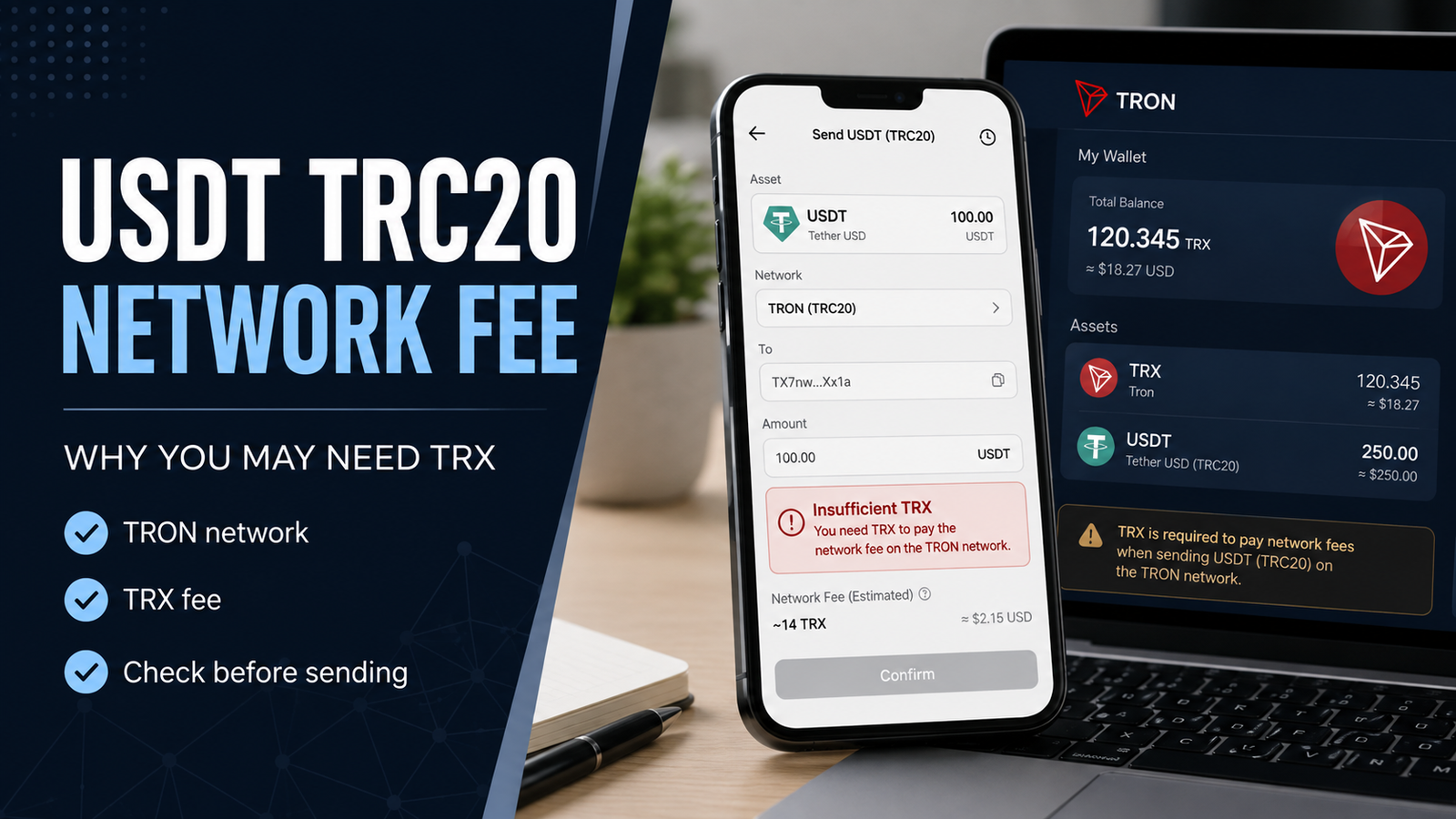
But when you try to send the transfer, the wallet may tell you that you need TRX.
This can make a simple question appear:
“If I am sending USDT, why do I need TRX?”
The answer is connected to how the TRON network processes transactions.
USDT is the token you are sending, while TRX is the native asset of the TRON network.
Understanding this difference can help you avoid failed transfers, unexpected fees and unnecessary payments to strangers who promise to “unlock” your USDT.
USDT and TRX Are Not the Same Thing
Start with the basic difference.
USDT is a stablecoin.
TRX is the native asset of the TRON network.
When USDT is used as a TRC20 token, the transfer happens through the TRON blockchain.
So there are two things involved:
- the asset being transferred: USDT,
- the blockchain processing the transfer: TRON.
This is why having enough USDT does not always mean your wallet has everything required to make an on-chain transfer.
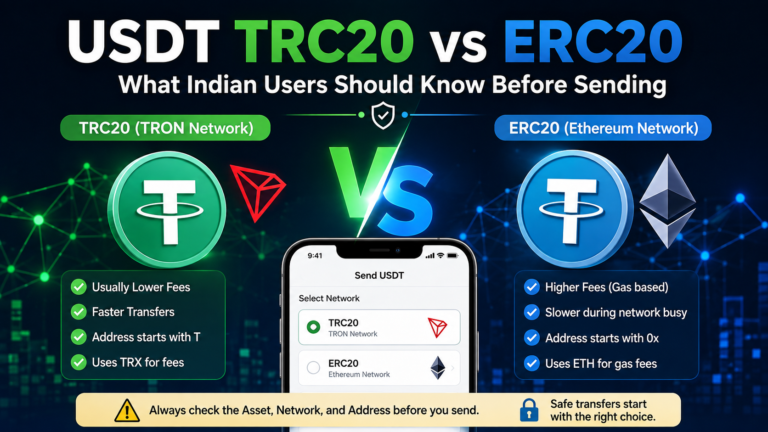
If you are still unsure about different USDT networks, our USDT TRC20 vs ERC20 guide explains the difference in simple terms.
Why Can a TRC20 Transfer Need TRX?
The TRON network uses resources when transactions are processed.
Two terms you may see are:
- Bandwidth,
- Energy.
You do not need to become a blockchain developer to understand them.
For an everyday user, the important idea is simple:
A blockchain transaction uses network resources.
A TRC20 token transfer involves a smart contract, so it can require resources to process the transaction.
If the account does not have enough available network resources, TRX may be used to cover the required cost.
That is why a wallet can show a TRX requirement even when the token you want to send is USDT.
Think of USDT as the Payment and TRX as Part of the Network Cost
A simple way to understand it is to separate the payment from the network.
Suppose you want to send:
100 USDT
The recipient is supposed to receive the USDT transfer.
But the blockchain also needs to process that transaction.
The 100 USDT is the asset being transferred.
The network cost is a separate part of the transaction.
This is why you should not think:
“I have 100 USDT, so I only need 100 USDT in my wallet.”
For a self-custody wallet, you may also need enough TRON network resources or TRX to complete the transaction.
Why Does My Wallet Say “Insufficient TRX”?
This message can appear when your wallet does not have enough of what it needs to pay the network cost.
The exact wording varies by wallet.
You may see something similar to:
- Insufficient TRX
- Not enough TRX
- Insufficient balance for network fee
- Insufficient Energy
- Transaction cannot be completed
- Network fee required
Do not immediately assume your USDT is frozen.
First, check what the message is actually referring to.
Your USDT balance and your available TRX balance are separate.
You may have plenty of USDT but not enough TRX for the network requirement shown by your wallet.
Do Not Send More USDT to Fix a TRX Problem
This is an important distinction.
Suppose your wallet has:
500 USDT
but it says that the transfer cannot be completed because there is not enough TRX.
Adding another 100 USDT does not solve the TRX requirement.
You would simply have:
600 USDT
while the original problem may still exist.
Before adding any funds, read the wallet message carefully.
Understand which asset or resource is actually missing.
Is There One Fixed USDT TRC20 Fee?
Do not assume there is one universal fee that applies to every USDT TRC20 transfer.
The amount shown to you can depend on how the wallet or platform handles the transaction and the network resources involved.
A self-custody wallet may show the network requirement differently from an exchange.
An exchange may show a withdrawal fee before you confirm the transfer.
Another wallet may calculate what is required for the on-chain transaction.
Because of this, statements such as:
“Every TRC20 transfer always costs exactly X TRX”
should be treated carefully.
Check the actual fee information shown by the service you are using before confirming the transfer.
Exchange Withdrawal Fees and Wallet Network Costs Can Look Different
This is another common source of confusion.
Imagine that you are withdrawing USDT TRC20 from an exchange.
The exchange may show something like:
Amount
Network
Withdrawal fee
Amount received
The exchange is managing the blockchain transaction for you.
Its withdrawal fee may be presented according to its own fee structure.
Now imagine that you hold USDT in a self-custody wallet.
You control the wallet and are making the blockchain transaction directly.
The wallet may show the TRON network resource or TRX requirement.
These situations are related to sending USDT, but they are not exactly the same.
Always check whether you are looking at:
- an exchange withdrawal fee,
- or the network requirement of your own wallet.
What Are Bandwidth and Energy?
You may see these words when reading about TRON.
Bandwidth is a TRON network resource used by transactions.
Energy is another resource associated with smart contract execution.
TRC20 tokens use smart contracts.
For a normal user, you do not need to calculate every technical unit manually.
What matters is understanding why these terms can affect a transfer.
If your wallet has the resources needed, the way the cost appears may differ.
If those resources are not enough, the network may require TRX to cover the transaction.
Your wallet normally handles the technical calculation before you confirm the transfer.
Do You Need to Buy a Large Amount of TRX?
Not automatically.
Do not purchase a large amount simply because someone online tells you that every USDT wallet needs a certain fixed TRX balance.
Start with the wallet you actually use.
Open the USDT transfer screen.
Enter the receiving address carefully.
Select the correct network.
Enter the amount.
Then look at the fee or resource information shown before confirming the transaction.
The wallet should give you a better idea of what is required for that particular transfer.
Do not guess first and buy later.
Check first.
Be Careful When Someone Offers “Cheap TRON Energy”
You may see people or websites offering services related to:
- TRON Energy,
- TRX fees,
- cheaper TRC20 transfers,
- fee reduction,
- transaction activation.
Some services may be legitimate tools in the TRON ecosystem.
But a user who simply wants to send USDT should still be careful.
Do not connect your wallet to a random website just because it promises a cheaper transfer.
Never provide:
- seed phrase,
- recovery phrase,
- private key,
- wallet password,
- OTP,
- or remote access to your device.
Saving a small network fee is not worth giving someone control of your wallet.
Your Seed Phrase Is Never a Network Fee
This sounds obvious, but it is worth saying.
A network fee involves the blockchain transaction.
Your seed phrase controls access to your wallet.
They are completely different.
If someone says:
“We need your recovery phrase to calculate the TRC20 fee.”
Stop.
If someone says:
“Send your private key so we can add Energy.”
Stop.
A legitimate blockchain transaction does not require you to give a stranger your wallet credentials.
Check the Network Before Adding TRX
Before solving a fee problem, make sure you are actually preparing the correct transaction.
If the receiving platform gave you a USDT TRC20 deposit address, confirm that TRC20 is selected on the sending side.
Do not add TRX and then send the USDT through the wrong network.
Network selection comes first.
Fee checking comes after that.
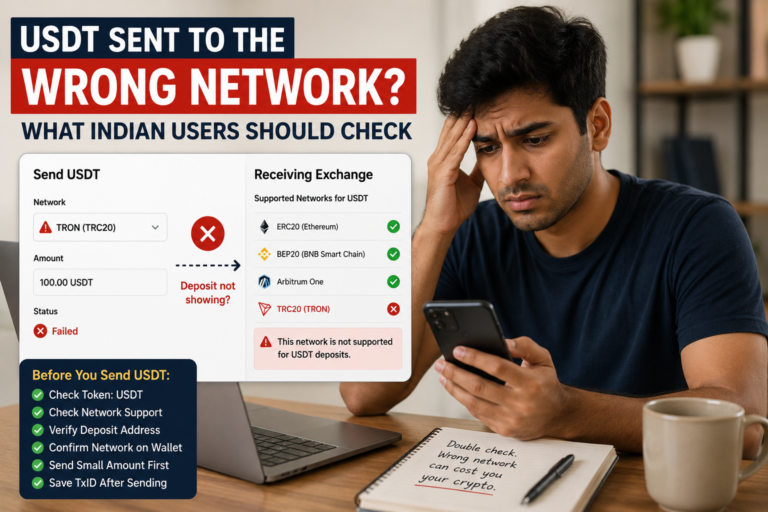
If you accidentally used another network, our USDT sent to the wrong network guide explains what you should check before making another transfer.
Check the Receiving Address Too
A sufficient network fee does not make a wrong address safe.
You can have:
- enough USDT,
- enough TRX,
- the correct TRC20 network,
- and still send to the wrong destination.
So before confirming the transfer, compare the receiving address carefully.
Do not rely only on the first character.
If your wallet supports address-book features, still make sure you selected the intended recipient.
For an important transfer, take a few extra seconds to verify the destination.
What If You Have TRX but the Transfer Still Fails?
Do not immediately add more TRX.
First read the error message.
A transaction can have other problems.
Check:
- Is the receiving address valid?
- Did you select the correct network?
- Does the receiving platform support USDT TRC20?
- Is the wallet connected properly?
- Does the wallet show a different network or resource error?
- Is the transaction already pending?
- Has a TxID been created?
The phrase “transaction failed” does not automatically mean “buy more TRX.”
Find the actual reason first.
Check Whether a Transaction Already Exists
This becomes especially important if you pressed Send and then saw an error or delay.
Open your wallet transaction history.
Look for the transfer.
Check whether it has:
- a TxID,
- transaction hash,
- pending status,
- completed status,
- failed status.
If a TxID exists, you can check the blockchain transaction itself.
For USDT TRC20, our guide on how to check a USDT TRC20 transaction on TRONSCAN explains the process.
Do not create another transfer until you understand what happened to the first one.
What If TRONSCAN Shows the Transaction as Successful?
If the blockchain transaction is successful, the network has already processed the transaction.
At that point, adding more TRX will not make that same transaction “more successful.”
Instead, check:
- receiving address,
- USDT amount,
- receiving platform,
- deposit status.
If the receiving wallet or exchange has not credited the USDT yet, the issue may now be on the receiving side rather than with the network fee.
The TxID can help you identify the transaction when contacting official support.
What If No TxID Appears?
The answer depends on where you are sending from.
If you are withdrawing from an exchange and the status still says Processing with no TxID, the exchange may still be handling the withdrawal before it reaches the blockchain.
Our USDT TRC20 withdrawal stuck guide explains how to separate sending-platform processing from an on-chain TRON transaction.
If you are using your own wallet and the transfer was rejected before being broadcast, read the wallet error carefully.
Do not assume the blockchain received a transaction when no transaction was actually created.
Does the Recipient Need TRX to Receive USDT?
Do not automatically send extra TRX to the recipient just because you are sending USDT TRC20.
Receiving USDT and later sending USDT are different actions.
The sender needs to meet the requirements for the transaction being made.
If the recipient later wants to make their own on-chain USDT transfer from a self-custody wallet, they may then need to deal with the network resources or TRX required by their own transaction.
Do not add extra transfers unless there is a clear reason.
Why Can the Fee Look Different From a Previous Transfer?
Users sometimes compare today’s transfer with one they made before.
For example:
“Last time my wallet required less TRX.”
That does not automatically mean something is wrong.
The transaction environment may not be identical.
Your available TRON resources may be different.
The wallet may calculate the transaction differently.
The receiving situation may also be different.
Instead of assuming the previous transfer sets a permanent fee, check the current transaction details shown by your wallet.
Do Not Compare Exchange Fees Without Checking the Network
Suppose one exchange appears to charge less for a USDT withdrawal.
Before choosing it only because of the fee, check:
- Is the network TRC20?
- Is the receiving platform compatible?
- What amount will actually arrive?
- Is there a minimum withdrawal?
- Is there a minimum deposit on the receiving side?
A lower-looking fee is not useful if you accidentally choose an unsupported network.
The network and receiving instructions remain more important than saving a small amount.
A Small Test Transfer Can Be Useful, but Check the Costs First
For an important new receiving address, some users prefer to send a smaller amount first.
This can help confirm:
- the address,
- the network,
- and whether the receiving platform detects the transfer.
But remember that a test transaction is still a real blockchain transaction.
It may also have a network cost.
So if you send a test amount and then the main amount, you are making two transactions instead of one.
Decide whether that makes sense for the amount you are sending and the fee shown by your wallet.
Do Not Let a Fee Warning Turn Into a Scam
A common pattern is simple.
A user sees:
Insufficient TRX
They search for help.
Someone contacts them and says:
“Send me your USDT and I will pay the fee for you.”
Or:
“Your USDT needs activation.”
Or:
“Pay this address and your wallet will unlock.”
Do not rush.
A normal fee or resource issue should be investigated through your own wallet and the official service you are using.
You should not need to transfer your USDT to a stranger to solve a network-fee message.
What Should You Check Before Sending USDT TRC20?
Before you press Confirm, check the basics.
- Is the token USDT?
- Is the selected network TRC20?
- Does the receiving platform support TRC20?
- Is the receiving address correct?
- Is the amount correct?
- What network fee or resource requirement does the wallet show?
- Do you have what the wallet requires to complete the transfer?
- Are you using the official wallet or exchange?
- Have you checked any warning shown before confirming?
Our USDT payment safety guide covers the wider checks that are useful before sending a crypto payment.
If a Transfer Does Not Work, Diagnose Before Adding Funds
When a USDT TRC20 transfer fails, avoid immediately doing all of these:
- buying more TRX,
- adding more USDT,
- creating another withdrawal,
- changing networks,
- connecting to a random website.
First identify the problem.
If the wallet specifically shows a TRX or resource shortage, deal with that requirement through the wallet you trust.
If it shows a network error, check the network.
If a TxID already exists, check the blockchain.
If an exchange withdrawal is still Processing, check the withdrawal status.
Each problem has a different next step.
A Simple Way to Think About USDT TRC20 Fees
When you send USDT TRC20 from a self-custody wallet, think about three separate things:
First:
What am I sending?
USDT.
Second:
Which network am I using?
TRON through TRC20.
Third:
What does the network need to process the transaction?
TRON network resources, which may result in a TRX cost when the available resources are not sufficient.
Keeping these three questions separate makes the process much easier to understand.
Having enough USDT is only one part of preparing the transfer.
Before pressing Send, also check the network, address and fee information shown by your wallet.
And if something looks different from your previous transaction, check the current details instead of assuming that every TRC20 transfer must cost exactly the same amount.