USDT TRC20 vs ERC20: What Indian Users Should Know Before Sending
You want to send USDT.
The receiving platform gives you two options:
TRC20
ERC20
Both say USDT, so it may look like the only difference is the name.
It is not.
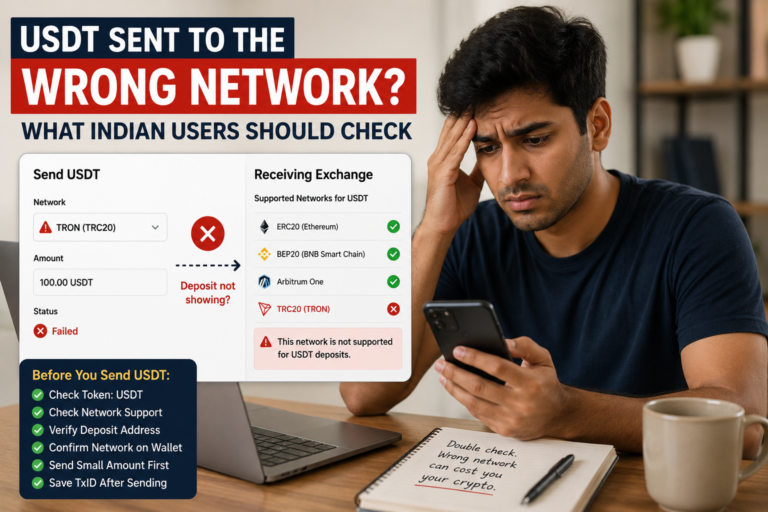
TRC20 and ERC20 use different blockchain networks. Choosing the wrong network can create a payment problem that may be difficult to correct later.
That is why understanding USDT TRC20 vs ERC20 matters before you press Send.
You do not need to become a blockchain expert. You only need to know what to check and why the network shown on your screen matters.
The USDT May Be Familiar, but the Network Is Different
USDT can be issued and transferred on different blockchains.
When you see:
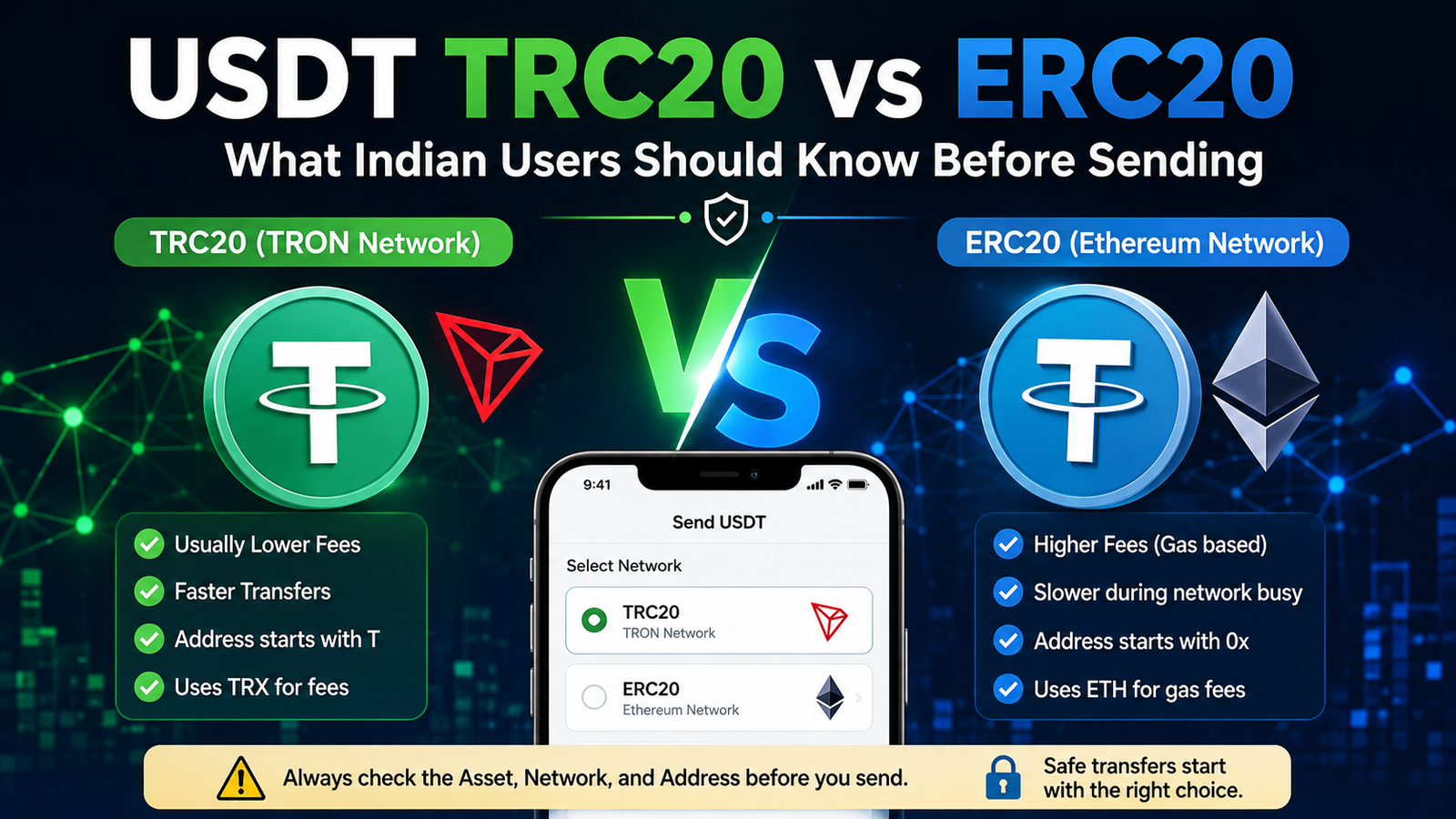
USDT TRC20, you are dealing with USDT on the TRON network.
When you see:
USDT ERC20, you are dealing with USDT on the Ethereum network.
The asset name may still be USDT, but the network carrying the transaction is different.
A simple way to think about it is:
USDT is what you are sending.
TRC20 or ERC20 tells you which network is being used to send it.
Our USDT payment safety guide explains why checking both the asset and network should happen before every important transfer.
Do Not Choose a Network by Guessing
Suppose a platform shows you a USDT deposit address and says:
Network: TRC20
When you withdraw from another wallet or exchange, you may see several network options.
Do not choose ERC20 simply because you recognise the name Ethereum.
Do not choose TRC20 only because someone told you it is always cheaper.
And do not select a network at random just to complete the payment faster.
Go back to the receiving platform and check which network it tells you to use.
The safest choice is the network that both the sending and receiving sides support for that specific transfer.
Start From the Receiving Side
Before choosing TRC20 or ERC20 on the sending screen, open the place where the USDT is going.
This may be:
- another wallet;
- a crypto exchange;
- a merchant;
- an online service;
- another supported platform.
Look at its deposit or payment page.
Check:
- the asset says USDT;
- the selected network;
- the deposit address;
- any minimum deposit amount;
- any warning or special instruction.
Only after checking the receiving side should you select the network on the sending side.
This simple order can prevent a lot of confusion.
TRC20 Means the TRON Network
TRC20 is a token standard used on the TRON blockchain.
When a wallet or exchange offers USDT-TRC20, the transfer is taking place through TRON.
A TRON address often looks different from an Ethereum address. A normal TRON address commonly starts with the letter T.
That can be a useful clue when checking a payment.
But do not use the first letter as your only safety check.
Always confirm what the receiving platform itself says about the network and address.
ERC20 Means the Ethereum Network
ERC20 is a token standard used for fungible tokens on Ethereum.
When a platform offers USDT-ERC20, the transaction is using Ethereum.
A normal Ethereum address begins with:
0x
Again, this can help you notice that the address format looks different from a typical TRON address.
But an address that begins with 0x does not automatically prove that you selected the correct USDT deposit network for a particular service.
The deposit instructions still matter.
The Address Format Can Help, but It Is Not Enough
Imagine you see an address beginning with T.
That may be a clue that you are looking at a TRON address.
Or you see an address beginning with 0x, which is normal for Ethereum.
Those differences are useful.
But payment safety should never depend on recognising one character.
Before sending, check all three:
Asset: USDT
Network: TRC20 or ERC20
Address: the exact address supplied by the receiver
If one of those does not match what you expected, stop.
Why You Should Not Focus Only on Fees
Many users first ask:
Which is cheaper, TRC20 or ERC20?
That is understandable.
But it is not the first question you should ask.
The first question should be:
Which network does the receiver support?
Network costs can change, and exchanges or wallets may also set their own withdrawal fees.
The amount you see today may not be the same next week or on another platform.
So before sending:
- check the withdrawal fee shown on your screen;
- check how much USDT will actually be sent;
- check any minimum withdrawal requirement;
- check any minimum deposit requirement on the receiving side.
A cheaper transaction is not useful if you send it through a network the receiver did not tell you to use.
The Networks Handle Transaction Costs Differently
Ethereum and TRON do not use exactly the same fee system.
Ethereum transactions use gas, and transaction fees on Ethereum are normally associated with ETH.
TRON uses network resources known as Bandwidth and Energy. Depending on how the wallet or transaction is handled, TRX may also be involved in covering network resource costs.
You do not need to calculate all of this manually when making a normal transfer through an exchange.
The practical rule is much simpler:
Read the fee shown before confirming.
Do not assume that every TRC20 transaction has the same cost or that every ERC20 transaction has the same cost.
Check the Address After Choosing the Network
Do not select the network and immediately press Send.
After choosing TRC20 or ERC20, check the address again.
Compare several characters at the beginning and end with the address shown on the receiving platform.
For an important payment, compare more than that.
Copy and paste is useful, but it should not replace verification.
If the pasted address looks different from the one you copied, stop immediately.
Our bank transfer safety guide uses the same basic principle for account numbers: convenience should never replace checking the receiver details.
Be Careful When Switching Networks
Some exchanges remember your previous withdrawal settings.
That can be convenient, but it can also create mistakes.
For example, your last withdrawal may have used TRC20 while today’s receiving platform asks for ERC20.
Do not assume yesterday’s settings are correct for today’s payment.
Each new transfer deserves its own check.
This becomes especially important if you use several exchanges, wallets, or services.
A Saved Address Is Not a Guarantee
You may have saved a wallet address in your exchange address book.
That reduces the need to copy it every time, but it does not remove the need to check the network.
Ask:
Is this still the correct receiving address?
Is the network still the same?
Does the receiving service still support this deposit method?
If the destination is important, open the receiving platform again and confirm the current details.
Consider a Test Transfer for a Large Payment
If you are sending a significant amount to a new destination, a small test transfer may be useful.
But first check:
- whether the destination has a minimum deposit;
- whether the sending platform has a minimum withdrawal;
- whether the network fee makes a tiny test transfer impractical.
If a test transfer is suitable, wait until it appears correctly at the destination before sending the remaining amount.
A successful test does not replace checking the final transfer details, but it can provide additional confidence when using a new address or platform.
What If the Receiving Platform Supports Both?
Sometimes the receiving service supports both TRC20 and ERC20.
In that case, either option may be available.
But you still need to choose one network and then use the matching network on the sending side.
Do not open a TRC20 deposit address and then select ERC20 for the withdrawal.
If you decide to use ERC20 instead, go back and select ERC20 on the receiving side first, then use the deposit details shown for that network.
The two screens should agree.
Do Not Let Someone Change the Network Through Chat
Be careful if someone sends you a message saying:
“Don’t use the network shown on the website. Use this one instead.”
“Send ERC20 to this different wallet.”
“Our TRC20 address changed. Send here now.”
“The payment failed. Send again using another network.”
Maybe there is a genuine explanation.
But unexpected payment changes should be verified independently.
Open the official platform yourself instead of trusting only a Telegram, WhatsApp, email, or social media message.
Our guide on fake customer care numbers explains why an official-looking support identity should not automatically be trusted.
What If You Select the Wrong Network?
First, do not panic and do not immediately send the USDT again.
Save the transaction information, including:
- the amount;
- network used;
- address;
- transaction ID or hash;
- sending platform;
- intended receiving platform.
Then check the transaction status.
If it has already been confirmed, contact the receiving wallet, exchange, or service through its official support channel.
Explain clearly which network you used and which network you intended to use.
Whether the funds can be recovered depends on the address, networks, platform and technical circumstances.
There is no safe rule saying every wrong-network transfer can be recovered.
There is also no safe rule saying every case is automatically impossible.
That is why prevention is more reliable than depending on recovery.
TRC20 Is Not “Better” Just Because Someone Uses It More
You may hear people say:
“Always use TRC20.”
Or:
“ERC20 is safer because it is Ethereum.”
Statements like these make a complicated choice sound too simple.
The correct network depends first on what the receiving service supports.
Fees, wallet support and user preferences can influence the choice when both networks are available.
But compatibility comes first.
The goal is not to find one universal winner.
The goal is to send USDT through the network you intended to use.
Crypto Payments Still Follow a Familiar Safety Rule
TRC20 and ERC20 may sound more technical than UPI or a bank transfer.
But the core safety habit is familiar:
Check the destination before sending money.
With UPI, you check the UPI ID and receiver.
With a bank transfer, you check the beneficiary and account number.
With USDT, you check the asset, network and wallet address.
Our guide to UPI vs bank transfer vs crypto explains how these payment methods differ while still sharing the same need for careful verification.
Three Things Must Match Before You Send
When choosing between USDT TRC20 and ERC20, do not make the decision based only on which option looks cheaper or faster.
Before confirming, make sure three things match:
1. The asset
You intend to send USDT.
2. The network
The sending network matches the network selected by the receiver.
3. The address
The wallet address matches the current deposit or payment address.
Then check the amount and fee one more time.
TRC20 and ERC20 are not simply two names for the same transfer route.
They are different networks for moving the asset.
Understanding that difference makes the final decision much easier:
Choose the network the receiver supports, verify the address, and check everything before you press Send.